LIVE
Coast
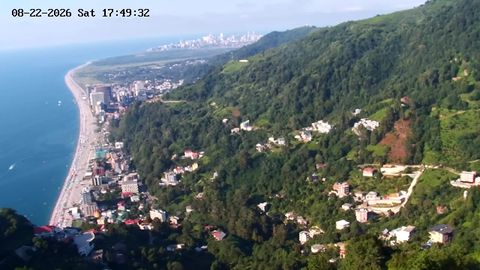
Cloud cover, visibility and the general situation by the sea
rtsp.me lets you set up a live stream from a weather IP camera in a few minutes. The video is available in a browser on a computer, phone or tablet, with no media server of your own to configure.
Bring cameras from different towns, regions and natural areas together in a single account. Show rainfall and snow, visibility, road conditions, snow cover and the current situation on site.
Connect a weather cameraA forecast tells you what the weather might be, while a weather webcam shows the actual conditions right now. Before setting off, a viewer can see whether it is raining or snowing, how cloudy it is, how good the visibility is and what state a road or a slope is in.
An online stream is useful wherever conditions change fast: in the mountains, on the coast, on mountain passes and in remote natural areas. A camera gives an up-to-date visual picture of the situation throughout the day.
Several weather cameras can be combined into a single system and managed through your rtsp.me account.
A weather camera shows visibility, cloud cover and the state of the surroundings at a particular spot at a glance. Streams like these are useful before a trip to the coast, the mountains or a tourist attraction.
Cloud cover, visibility and the general situation by the sea

The state of the slopes, the clouds and how far you can see
The service receives the RTSP stream from an IP camera and converts it into a format you can watch in a modern browser or embed on a website.
Starting an online stream does not require buying extra server hardware. Setting it up takes a few minutes:
Once connected, the stream becomes available from any device with an internet connection. For a camera that is not meant to be public, you can set up restricted access.
Live streams are in demand at tourist, transport and natural sites where visitors need to see the current conditions:
A single system can include cameras at several remote sites. That makes observation simpler and gives viewers one consistent way to get visual information about the weather.
A webcam helps a visitor judge the state of a beach, a ski slope, a promenade or a nature trail before setting out. Live video complements the written forecast and shows how busy the place actually is.
The player can be placed on a resort's website, a tourism portal, a town page or a camera map. Viewers do not need to install an app: the stream opens in the browser.
The camera shows visibility, precipitation, snow cover and the state of the carriageway at a particular spot. Information like this helps drivers judge conditions before a journey, and helps site staff keep an eye on remote stretches.
Visitors can see the cloud cover, the state of the water and the general situation on the shore. A public stream is both a useful service and a vivid showcase for a tourist destination.
A cloud archive lets you look at how the weather changed over the course of the day, reconstruct the situation at a particular moment and keep a history of visual observations. The retention period is chosen to suit the needs of the site.
Monitoring helps you spot signal loss or an unreachable camera in good time. That matters especially for a network of weather cameras spread across different towns and remote areas.
A weather camera can be made public, or viewing can be restricted. Password protection suits internal observation, while a domain restriction helps you show the embedded player only on an allowed site.
Connect your first weather IP camera in a few minutes and build a system of online streams without a media server of your own.
Give viewers up-to-date video from tourist attractions, roads, coasts and natural areas on any device.
Create an online stream