Live cameras for marinas and yacht clubs
rtsp.me lets you turn the existing IP cameras around a marina or a yacht club into convenient live streams.
Connect cameras that support RTSP and watch the video in an ordinary browser on a computer, a smartphone or a tablet. The streams can be used to keep an eye on the site, given to boat owners, or placed directly on the marina's website.
Connect a camera to rtsp.meAlready have IP cameras? Use them for a live stream
Many marinas, yacht clubs and ports already have a CCTV system in place. If the IP cameras support sending video over the RTSP protocol, they can be connected to rtsp.me without replacing the equipment you already own.
rtsp.me takes the video stream from the camera and makes it available for viewing in a modern web browser.
As a result, an existing CCTV camera can also become a convenient live camera for your staff, for boat owners or for visitors to your website.
What the cameras can show
Around a marina you can set up live streams from several points:
- quays and pontoons;
- berths for yachts and motorboats;
- the harbour entrance;
- the harbour around the marina;
- piers and the waterfront;
- the yacht club grounds;
- service and technical areas;
- access roads and the parking lot;
- slipways and launching points.
The cameras can run around the clock, so you can always look remotely at what is happening on site at that moment.
Live cameras for boat owners
Being able to look at your own boat remotely can become an extra service for a marina's customers.
The owner of a vessel can open the camera on a smartphone or a computer and check the berth, the state of the quay and the general situation around the boat.
That is particularly handy for owners who live in another city or country and visit the marina only from time to time.
Access to particular streams can be granted to staff, to boat owners or to other users, depending on what the marina needs.
Public webcams on the marina's website
Cameras can be used for more than internal monitoring. A live stream can be placed directly on the website of the marina or the yacht club.
Visitors to the site will be able to see:
- the current situation in the harbour;
- the state of the water;
- the weather;
- how busy the quays are;
- yachts and motorboats moving about;
- a panoramic view of the marina.
A webcam like this can be useful to regular customers and, at the same time, introduce prospective visitors to the yacht club's grounds. Instead of static photographs, people get to see the marina in real time.
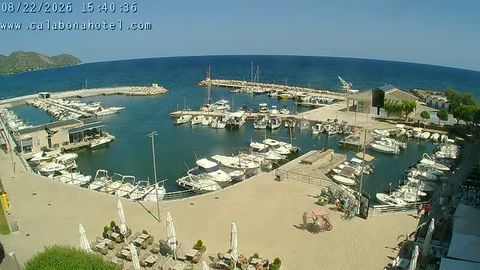
Main quay and pontoons
A view of the central berths for motorboats and yachts

Harbour entrance and the water
A panoramic view of the fairway and the weather conditions
How a stream from an RTSP camera works
Most professional IP cameras and CCTV systems send video over the RTSP protocol. Ordinary modern browsers cannot open an RTSP link directly.
rtsp.me solves that problem:
You add the camera's RTSP address to rtsp.me and get a ready-made live stream.
You can open it in a browser or embed it in a page on your own website. There is no need to develop your own video player or to set up a server yourself to convert RTSP video into a format browsers can handle.
Watching the cameras on a computer and a smartphone
Viewers do not need to install any special software to watch a stream. The camera can be opened in a browser on:
- a computer;
- a laptop;
- a smartphone;
- a tablet.
That suits marina staff and boat owners alike when they need a quick look at the current situation at the berths.
Keeping an eye on the marina
A large marina may take in several quays, technical areas, parking lots and outlying parts of the site.
Live cameras let staff take a quick look at the situation in different parts of the site without having to be physically next to every point. Cameras can be used to watch the quays, the mooring berths, the entrances, the parking lot and other areas that matter.
Video archive
Where you need it, a camera can use the rtsp.me cloud archive. If something disputed or out of the ordinary happens, staff can turn to the recording and look at events over the period they need. The archive can help when you are working through incidents on the quays, in the parking lot, on the yacht club grounds or in other monitored areas.
Monitoring the cameras
With a live stream it matters not only that the camera is connected, but also that you know whether it is still working. rtsp.me can keep track of the state of the cameras you have connected and notify you about availability problems.
That is particularly useful for marinas with a lot of cameras and outlying sites. Staff do not have to keep opening every stream by hand just to check that it is working.
Camera behind NAT, or no way to open a port?
It is not always possible to provide direct access to an RTSP camera over the internet. The camera may sit on the marina's closed local network, for instance, and the internet provider may use NAT or may not hand out a public IP address.
For scenarios like these you can use MyVMS Bridge, which lets you connect cameras without the usual arrangement of direct external access to the RTSP port. It is especially convenient for outlying sites and for existing CCTV systems whose network configuration is hard to change.
How to connect a marina camera to rtsp.me
A standard connection takes only a few steps:
- Create an rtsp.me account.
- Add a new camera.
- Enter the RTSP address of your IP camera.
- Check that the video stream is available.
- Get your ready-made live stream.
Once it is connected, you can share the link with users or embed the video player directly on the marina's website.
If compatible IP cameras are already installed on site, there is no need to buy separate cameras just for rtsp.me.
Frequently asked questions
Make your marina cameras available online
rtsp.me helps you use existing IP cameras not only as a local CCTV system but also as convenient live cameras.
Set up streams from the quays, the yacht berths, the harbour entrance and other areas. Give access to your staff and to boat owners, or place a public webcam directly on the yacht club's website.
Connect your first RTSP camera