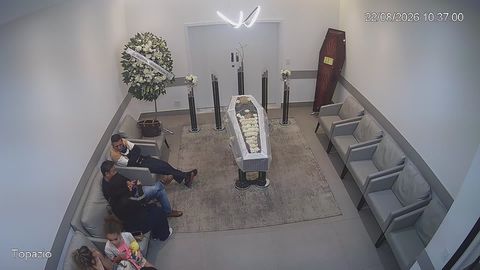
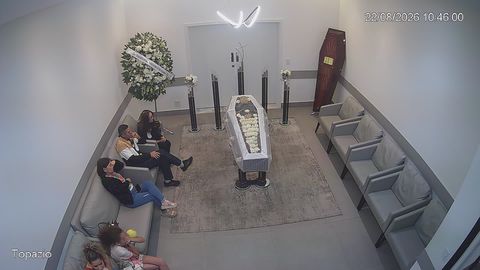
Online stream of a memorial service
For those close to the family who cannot travel, yet wish to be there at an important moment
Illness, distance, travel restrictions or a person’s state of health do not always allow them to attend a funeral in person. A closed online stream makes it possible to see and hear the service from another city or country.
rtsp.me delivers video from an IP camera to a browser. Those invited open a personal link on a smartphone or computer, with no app to install.
Arrange a stream
A way to be there
Being present online does not replace attending in person, but it does let family and friends follow the service as it happens, hear the words spoken in memory and share the moment with the family.
The link matters most to elderly relatives and those with limited mobility, people in hospital or abroad, and anyone who learned of the service too late to travel.
Viewing should be simple: one link to follow, a clear button to start, and the ability to open the video on a familiar device.
A calm wide field of view
The camera is placed so that the viewer can see the place of the service and the person speaking, without intrusive close-ups of those present. Before the service begins, the organizer checks the frame, the lighting and the sound.
Wide view of the hall
A calm field of view of the space, without undue intrusion
The service as it happens
The picture and the words of remembrance, for those invited
Restricted access
A stream of a funeral or memorial service should not be public by default. The organizer sends the link to the agreed circle of relatives and friends, and viewing can additionally be protected with a password.
Once the service has ended, access to the live stream should be closed. If a recording was made, the family separately decides how long it is kept and who may see it.
Important: the decision to film, to stream live and to record is taken with the family’s consent, and takes account of the rules of the venue, religious tradition and the applicable requirements for processing personal data.
Sound matters as much as the picture
For those taking part remotely it is particularly important to hear the person leading the service, the tributes from family and friends, the prayers and the music. A camera’s built-in microphone may not be enough for a large or acoustically difficult room.
Before the service, run a test from the same device that will carry the stream: check the volume of speech, background noise, delay and the stability of the internet connection.
A separate microphone, several sound sources or switching between cameras may call for additional equipment and a technical specialist.
What rtsp.me gives you
The service accepts an RTSP stream and makes it available to invited viewers through a modern browser.
- A simple linkFamily and friends connect without installing an app
- ProtectionViewing limited by password or by domain
- Any deviceViewing on a smartphone, tablet and computer
- RTSP cameraConnect compatible equipment that is already installed
- Several viewersThose invited can be present remotely at the same time
- MonitoringCheck the camera is available before the service begins
- Archive at the family’s decisionThe service is recorded only where that has been agreed as necessary
- EmbeddingA closed player on the organizer’s page
How to prepare the stream
- Obtain the family’s consent and agree the arrangements with the venue.
- Choose a calm wide field of view and check the sound quality.
- Add the RTSP camera in your rtsp.me account.
- Set up restricted access and a password if one is needed.
- Run a test viewing on a smartphone and on a computer.
- Send those invited the link, the start time and brief instructions.
- After the service, end access and deal with the recording according to the family’s decision.
Camera and microphone → RTSP →
rtsp.me → closed link → family and friends
For funeral services and ceremonial halls
A funeral director, a ceremonial hall, a crematorium or a religious organization may offer a closed stream as an additional option for the family.
The process should remain considerate: a designated member of staff checks the equipment in advance, sets up access, helps the family pass on the link and ends the stream after the service.
What to prepare for viewers
- the personal link and the password, if one has been set;
- the exact start time, with the time zone stated;
- a suggestion to join 10–15 minutes beforehand;
- a contact for a member of staff in case of technical difficulty;
- information about whether a recording will be available, if that has been agreed.
Frequently asked questions
Who can watch the stream of the service?
The organizer sends a personal link to the invited family and friends. Access can also be protected with a password or allowed only on a particular site.
Do viewers need to install an app?
No. The stream opens from a link in a modern browser on a smartphone, tablet or computer.
Can a recording of the service be kept?
Yes, if the family and the organizer have decided on a recording in advance. Access to the archive should be given only to the agreed circle of people.
Can a camera that is already installed be used?
Yes. An IP camera with a suitable wide field of view, sound and an accessible RTSP stream can be connected to
rtsp.me.
What if a relative is not confident with technology?
Send one direct link, ask them to open it in advance, and appoint someone who can help them check the sound before the service begins.
Is a separate video server needed?
No.
rtsp.me takes the stream from the camera and delivers the video to invited viewers through a browser.
Help family and friends be present online
Arrange a calm, closed stream for those who cannot come to the service in person.
Check the picture and sound in advance, send those invited a single link, and keep the family’s privacy intact.
Create a closed stream