 LIVE
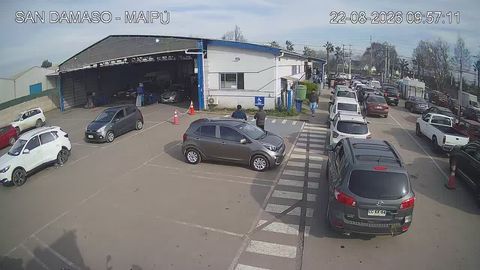
LIVEQueue and wash bays
How busy the car wash is, in real time
rtsp.me lets you connect the car wash's existing IP cameras and open the video in a browser on a computer, smartphone or tablet.
Run a public stream from the entrance, give staff private access to the working areas and keep recordings in the cloud archive — with no media server of your own.
Connect a car wash cameraA camera at the entrance helps a customer judge the queue in advance and pick a convenient time to come. The live stream can sit on the car wash website, on a page of its own, or in the section listing branch addresses.
Instead of ringing the front desk, a visitor opens the video in a browser and sees how busy it is right now: how many cars are waiting at the entrance, which self-service bays are free and what the site looks like overall.
A public camera becomes a genuinely useful service for customers and helps spread the flow of traffic more evenly through the day.
A live field of view helps the customer judge the queue and how busy the bays are, and helps the owner see the current situation on site.
LIVEHow busy the car wash is, in real time
The service takes the RTSP stream from an IP camera and makes it available in a modern web browser or on the car wash website.
If compatible IP cameras are already installed on site, there is no need to change your surveillance system. Starting the stream takes just a few steps:
A public camera can be shown to customers, while internal streams can be locked with a password or allowed only on a specified domain.
Where you put a camera depends on the job it has to do and on privacy requirements. At a car wash, cameras are typically used to watch the following areas:
For a public stream it is better to choose a wide shot of the entrance or the queue, without showing internal areas or details that are not meant for open access.
A manager can check how busy it is, how the bays are working and what the site looks like, straight from the browser. That is especially handy for a chain of car washes with branches in different districts or cities.
Every connected camera is available in one account. There is no need to install a separate program on each device or to maintain infrastructure of your own just to watch the video.
Cameras help you assess how the work is organized: how fast the queue moves, how busy the bays are, whether working procedures are followed and what condition the customer areas are in. Video complements your operational data and gives a clear picture of the situation.
At a self-service wash, remote viewing helps you keep track of which bays are free, the state of the equipment and general tidiness on site, even when the attendant is not standing next to every box.
The cloud archive lets you go back to the recording for the period you need. Video can help when a customer gets in touch, when there is a dispute about service times, when equipment is damaged or in any other unusual situation.
The retention period is chosen with the car wash's own needs and the rules for processing video data in mind. Access to the archive is granted only to authorized staff.
rtsp.me checks that connected cameras are available and notifies you on signal loss. Nobody has to open each stream by hand on a regular basis just to confirm it is still working.
The queue stream can be made public while cameras covering working and plant areas stay private. Password protection and a link to an allowed domain are both available for restricting who can watch.
Show customers the queue as it is now, set up remote oversight of the bays and keep recordings — with no media server of your own.
Add your first RTSP camera and have the stream open on any device within minutes.
Create a live stream